Password protected folders
Password protecting a folder/route
You can now protect a folder or directory with passwords.
Method
- Declare the protected folder’s path under
protectedRoutes(which is an array) inconfig/site.json. - Create a plain text file that is named
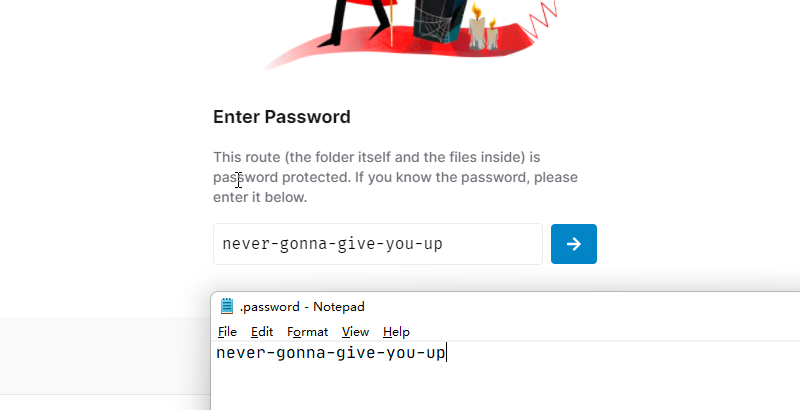
.password(character for character, must be this name), and move this file under the folder that you wish to password protect. - Open this
.passwordfile with a text editor, like VS Code or Notepad, and save the password inside (in plain text format). - Finally, redeploy your VercelDrive in Vercel so your website picks up the newest protected folder configs.
Details
If you are wondering what to define in protectedRoutes, here is an example.
Suppose we have the following folder structure:
.
├── Books
│   └── ...
├── Private folder
│   ├── this-is-public
│   └── u-need-a-password   <-- this is the folder to protect
├── Media
│   └── ...
└── README.md
We want to password protect the /u-need-a-password directory, so we would write inside protectedRoutes the absolute path to root.
NEXT_PUBLIC_PROTECTED_ROUTES=/Private folder/u-need-a-passwordIf you want to add another route, separate routes with commas.
NEXT_PUBLIC_PROTECTED_ROUTES=/Private folder/u-need-a-password,/another/protected-folderIf there is no directory to protect, do not set NEXT_PUBLIC_PROTECTED_ROUTES.
If you are confused about whether you need to encrypt your password, don’t. Put that plain text inside .password. Whatever you save inside .password, you are going to use as the password for entering the protected directory.
Caveats
Yes, all seemingly secure protections come at a cost.
-
The direct link of the files under your protected directory can be shared with the URL parameter
&odpt=<hashed_token>, if you really want to:https://your-drive.example/api/raw/?path=/Private%20folder/u-need-a-password/watch%20this.mp4&odpt=<hashed_token>Whether or not this exposes your password, protected files, personal information, etc., is all unknown. Use at your own risk.
-
I personally cannot guarantee that this protection is impenetrable and fully secure. Hence, I would not recommend protecting sensitive information with this method. Think of this as an extra layer of annoyance to keep files you want to share with only the people you wish.