Advanced
Use this page when you need to create your own Microsoft Entra app, change API permissions, enable uploads, or understand which environment variables replace the old config files.
Microsoft Entra App Registration
Open Microsoft Azure App registrations, sign in with the Microsoft account or tenant that owns the OneDrive, and create a new registration.
Recommended registration values:
- Name:
VercelDrive, or any name that helps you recognize the app. - Supported account types: accounts in any organizational directory and personal Microsoft accounts.
- Redirect URI:
Webandhttp://localhost.
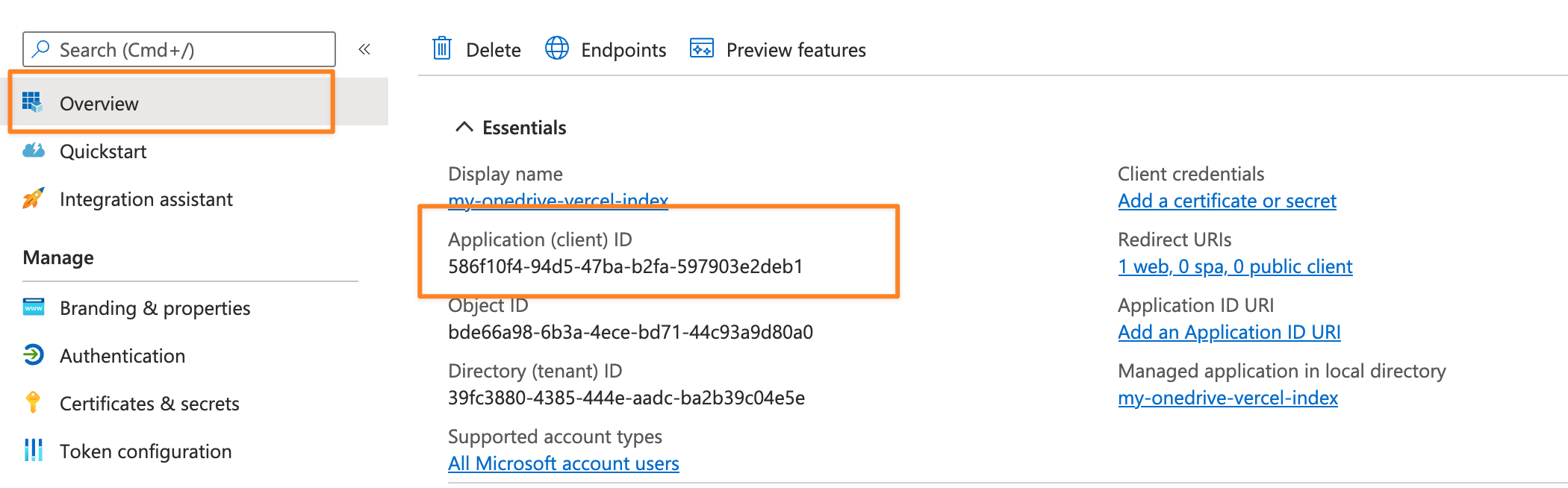
After registration, copy the Application (client) ID. This is your CLIENT_ID.
Client Secret
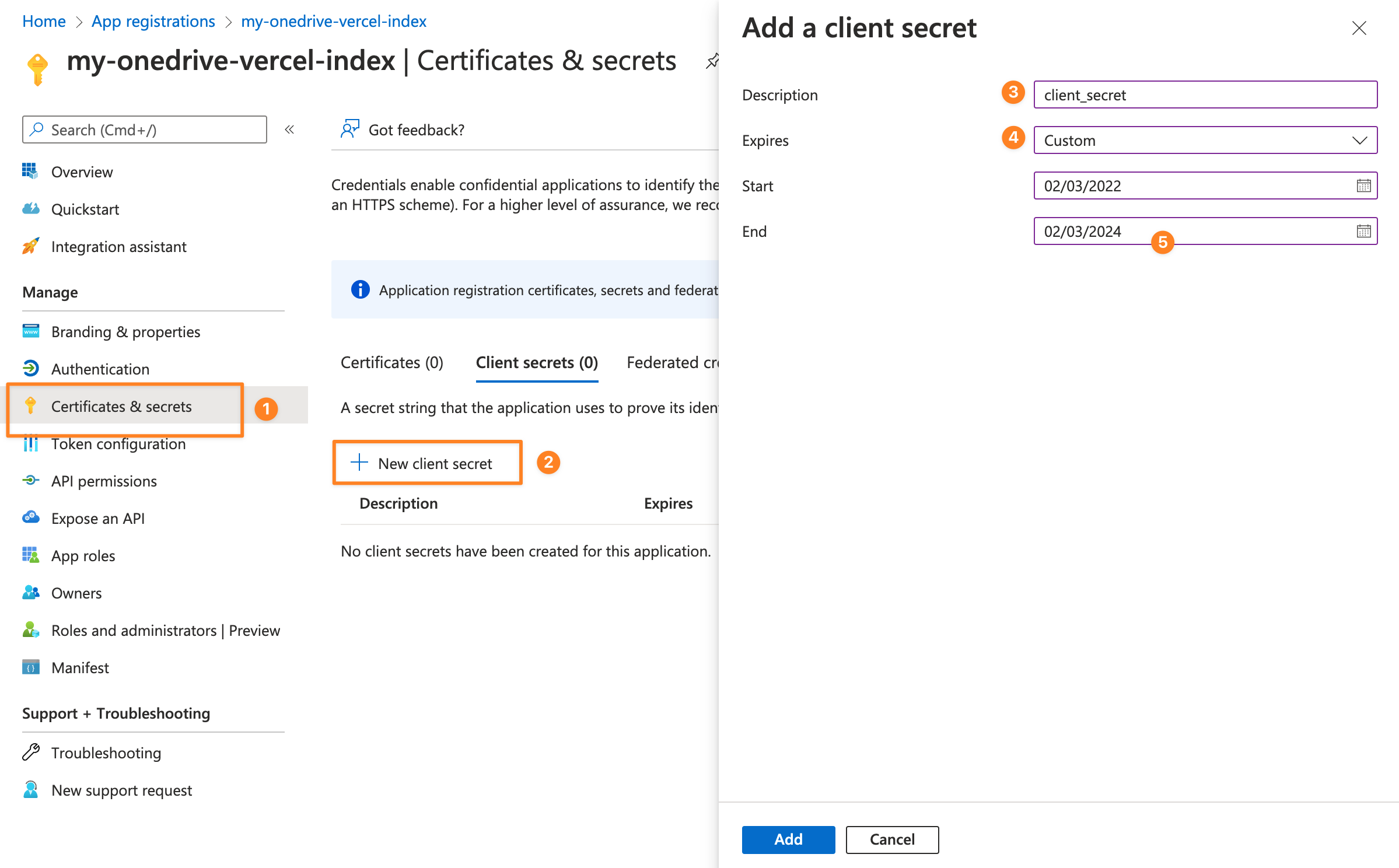
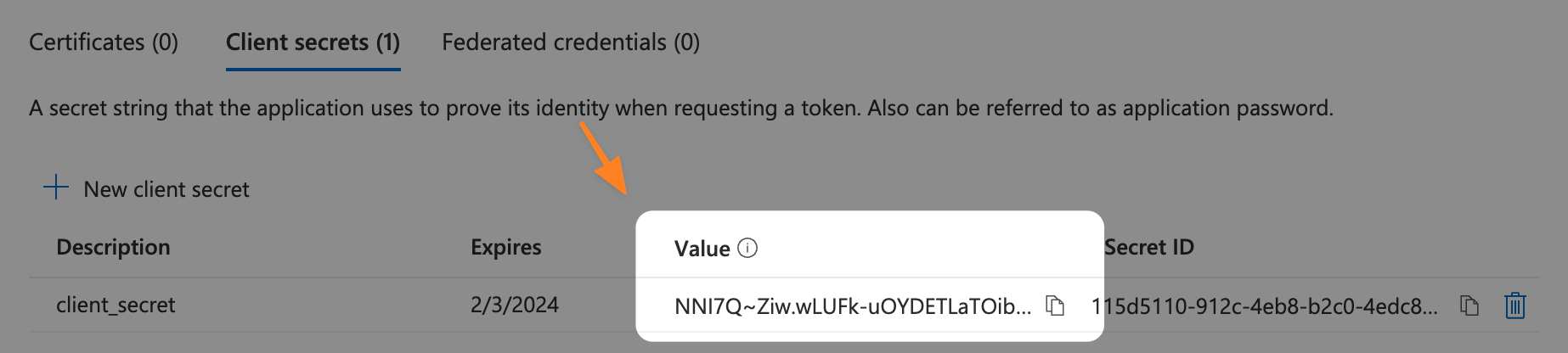
Open Certificates & secrets, create a new client secret, and copy the secret value immediately. Microsoft only shows the value once.
VercelDrive expects the client secret to be AES-obfuscated before it is stored as CLIENT_SECRET.
The result should look similar to this:
U2FsdGVkX1830zo3/pFDqaBCVBb37iLw3WnBDWGF9GIB2f4apzv0roemp8Y+iIxI3Ih5ecyukqELQEGzZlYiWg==API Permissions
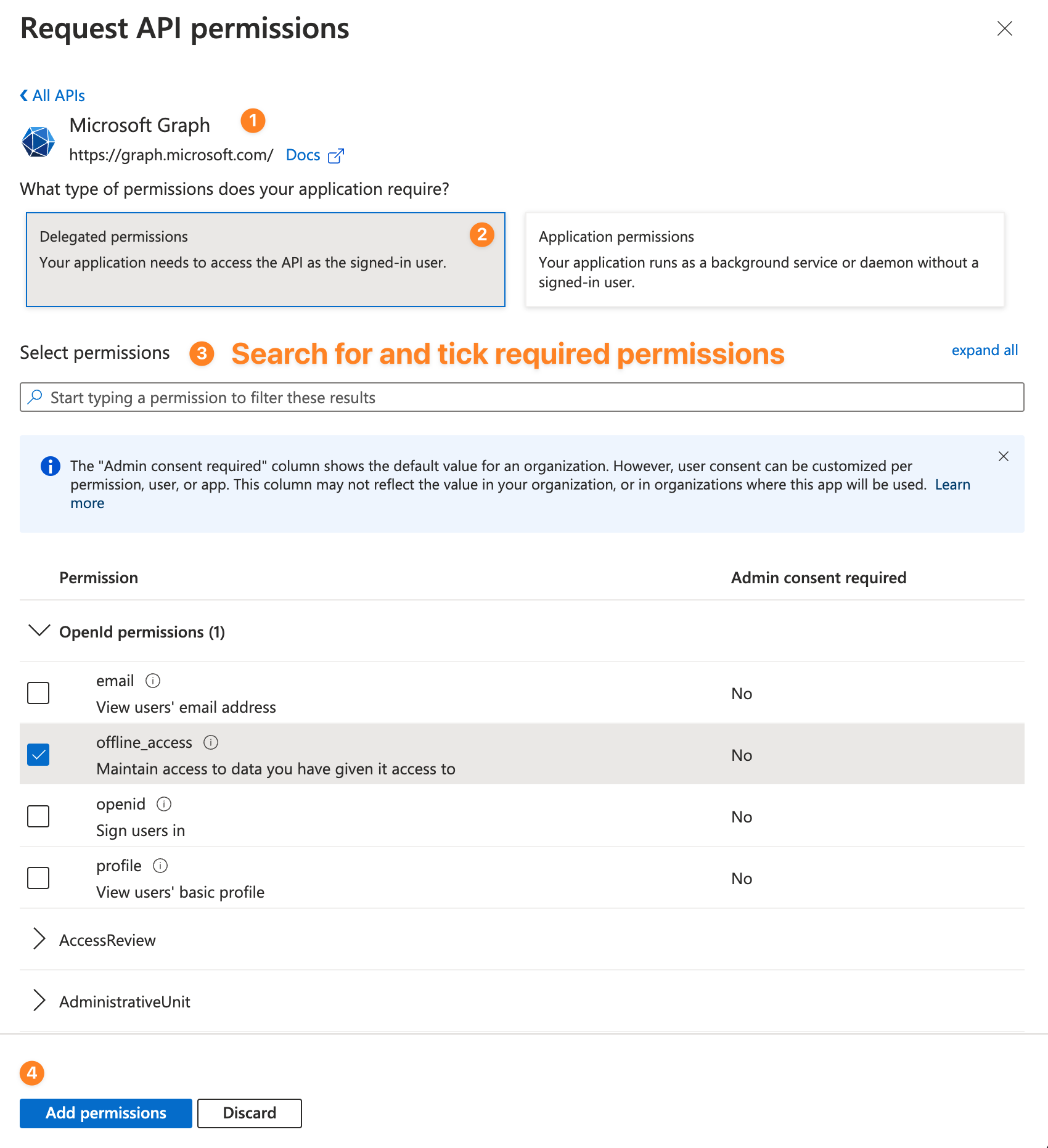
Open API permissions, select Microsoft Graph, select Delegated permissions, and add the scopes that match your setup mode.
Read-only mode
Use read-only mode when the site should only browse, preview, share, and download files.
Required delegated permissions:
User.ReadFiles.Read.Alloffline_access
Do not set UPLOAD_PASSWORD in Vercel for this mode.
Read/write upload mode
Use read/write mode when browser uploads and folder creation should be available.
Required delegated permissions:
User.ReadFiles.ReadWrite.Alloffline_access
Set UPLOAD_PASSWORD in Vercel. You can also set UPLOAD_CONFLICT_BEHAVIOR to rename, replace, or fail.
Changing permissions does not update already stored OAuth tokens. Clear <KV_PREFIX>access_token and <KV_PREFIX>refresh_token from Redis/KV, then authenticate again.
Environment Variables and Resources
These variables replace the old config/api.config.js and config/site.config.js setup.
| Variable | Required | Description | Resource |
|---|---|---|---|
NEXT_PUBLIC_SITE_TITLE | Yes | Title shown in the UI, for example 2Drive | Custom configs |
USER_PRINCIPAL_NAME | Yes | OneDrive account email, for example example@outlook.com | Getting Started |
BASE_DIRECTORY | Yes | Root OneDrive folder exposed by the site | Custom configs |
CLIENT_ID | Yes | Application (client) ID from Microsoft Entra App Registration | App Registration |
CLIENT_SECRET | Yes | AES-obfuscated client secret using the tool above | Client Secret |
REDIS_URL | Yes | Redis connection string (Upstash auto-injects on Vercel) | Cache |
UPLOAD_PASSWORD | Upload mode only | Server-side password that protects uploads | Password upload gate |
NEXT_PUBLIC_PROTECTED_ROUTES | Optional | Comma-separated protected folder paths | Password protected folders |
KV_PREFIX | Optional | Redis key prefix when multiple deployments share one Redis | Cache |
NEXT_PUBLIC_EMAIL | Optional | Contact email shown in the site header | Custom configs |
UPLOAD_CONFLICT_BEHAVIOR | Optional | Duplicate-name behavior: rename, replace, or fail | Upload conflict behavior |
Only variables intentionally used in the browser should start with NEXT_PUBLIC_.
Password Upload Gate
Uploads are protected by UPLOAD_PASSWORD. The browser submits the password to /api/upload/auth, and the server sets a short-lived, HTTP-only upload authorization cookie. Upload APIs still verify that authorization server-side on every request.
Important behavior:
- Leaving
UPLOAD_PASSWORDempty disables uploads. - The password is never a
NEXT_PUBLIC_variable. - The UI password prompt is not the security boundary; the API route checks are.
- The upload session can be cleared by signing out, waiting for the cookie to expire, or clearing site cookies.
Upload Conflict Behavior
UPLOAD_CONFLICT_BEHAVIOR controls what happens when an uploaded file has the same name as an existing OneDrive file.
Supported values:
rename: keep both files and let OneDrive rename the new file.replace: overwrite the existing file.fail: reject the upload when a file already exists.
If the variable is missing or invalid, VercelDrive uses rename.
Token Reset For Permission Changes
When you change Microsoft Graph permissions, clear the stored tokens before authenticating again.
Redis keys:
<KV_PREFIX>access_token
<KV_PREFIX>refresh_token
If KV_PREFIX is empty, the keys are simply access_token and refresh_token.
An upload-authorized admin can also call:
POST /api/upload/reset-auth-tokensCustom Domain
Custom domains are configured in Vercel under Project Settings > Domains. See Vercel custom domain documentation.